Monday, January 30, 2017

NetWorker client file index database Size

For the NetWorker client file index database (nsr/index): The number of files
indexed and in the browse policy. This is normally the largest of the NetWorker
databases. For storage sizing, use this formula:


Index catalog size = {[(F+1)*N] + [(I+1) * (DFCR*N)]} * [(1+G)*C]


where:

F = 4 (Full Browse Period set to 4 weeks)

N = 1,000,000 (one million files for this example)

I = 24 (A four week browse period for incremental backups - minus the full backups)

DFCR = 3% (Daily file change rate for standard user file data)

G = 25% (estimated annual growth rate %)

C = 160 bytes (Constant number of bytes per file)

For example:

{[(4+1)*1,000,000] + [(24+1) * (3%*1,000,000)]} * [(1+.25)*160]

{5,000,000 + [25 * 30,000)} * [1.25 * 160]

5,750,000 * 200 bytes

= 1,150,000,000 bytes

= 1150 MB


Saturday, November 26, 2016

RPC error: RPC program or version mismatch

We have looking today for RPC error: RPC program or version mismatch

There is a mismatch between the version of the Remote Procedure Call (RPC) service requested by the client and the service available on the server. 

This problem might be the result of an incorrect "Name to Address" resolution. 

There is a mismatch between the version of the RPC service used by the License Manager (lgtolmd) and the services available on the server. The default RPC version for lgtolmd is two.

Use rpcinfo to verify that the server and the clients are running the same version of RPC. For operating systems without the rpcinfo utility, it is provided on the EMC product CD.

Update the NetWorker software on the client or server.

Verify that the "Name to Address" resolution is correct. Test by running nslookup using the fully qualified domain name of the computer. On Windows systems, this verification also can be performed from the Network control panel.

Specify the same version of RPC for lgtolmd that is used by the other backup services on the backup server. This can be specified by either:

Entering the following command at the command line:

# lgtolic -s hostname:rpc_number:rpc_version


Setting the LMD_VERSION environment variable.

Monday, October 31, 2016

Networker backup group hung and unable to stop by GUI

Networker backup group hung and unable to stop by GUI

Error: "Group must be started either automatically or from the GUI and must be currently running in order to be stopped"

You can handle this scenario in two ways.


  •         You can kill the job PID by command line (make sure not PPID, read differenbetween PID and PPID)


  •                Another way is, use to savegrp command.


                  bash-$ savegrp -pvvv groupname

Make sure use first savegrp option if not resolved then you can use kill PID option

Thursday, September 8, 2016

EMC NetWorker backup logs files paths and details for Windows

Hi,

Today here I would like to provide details of the log files available on a Windows Networker server and log
file management.

Windows Networker Server Log Files:-


Windows NMC Server Log files:


Windows Networker client Log Files:-


There is two types of logs files:

*.log >> It is plan text file and human readable
*.raw>> It is not human readable format


You can view manually raw files with help of nsr_render_log Networker command.
You can also set it in runtime with help of nsradmin and "update runtime rendered log" Networker configuration commands.

The nsr_render_log send the output result to stdout

You can also rollover the files by time and size with help of below commands:

nsradmin
update runtime rollover by time
update runtime rollover by size


Thanks


Tuesday, August 30, 2016

EMC NetWorker backup logs files paths and details for Unix/Linux

Hi,

Today here I would like to provide details of the log files available on a Unix Net-worker server and log
file management.

Networker Server Log Files:-


Networker Server Log Files:-


Networker Client Log files:-


There is two types of logs files:


*.log >> It is plan text file and human readable
*.raw>> It is not human readable format


You can view manually raw files with help of nsr_render_log Networker command.
You can also set it in runtime with help of nsradmin and "update runtime rendered log" Networker configuration commands.


The nsr_render_log send the output result to stdout


You can also rollover the files by time and size with help of below commands:


nsradmin
update runtime rollover by time
update runtime rollover by size


Thanks

Thursday, June 30, 2016

How to Delete VBA Node in Networker

How to Delete VBA Node in Networker

Networker Ver: 8 to 9

If you want to remove VBA node entirely and delete it's backups from Networker server. The VBA node is online and responding to request from Networker server. Before Doing anything please consult with EMC Support for Assistance because VBA Node delete/remove is not recommended by EMC as a troubleshooting step.

Before starting any critical configuration you should take first backup of nsrdb and mm directories (Particular directory which related with that configuration)

Connect to Networker backup server and open the following directory

 <networker-install>\nsr

e.g   
·         Unix: /nsr/ 
·         Windows C:\Program Files\EMC NetWorker)

Make a copy of the following directories:

res\nsrdb
res\mm

After successfully copied mentioned directories you can start your actual configuration.

Remove all save sets for the client-id for this VBA node

List the Saveset:

mminfo  –c  <vba-name>  -kot

Remove Saveset:

nsrmm -d -S <SSID>

If the VBA is NOT online, then use the -X option to delete the Save set:

nsrmm -X -d -S <SSID>

Remove all workflows associated with the VBA and Delete VBA Mtree

Using GUI (NMC):

1. Login to NMC

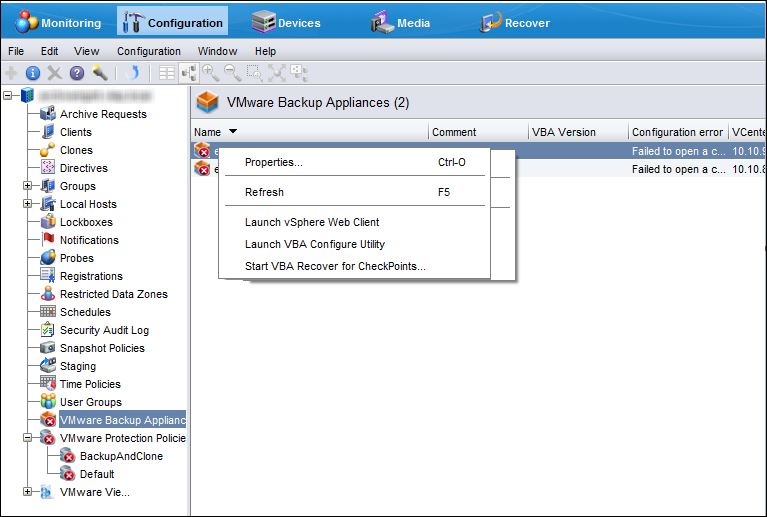
2. Go to Configuration tab and click VMware Protection Policies

3. Sort the policies by VBA List

4. Open the first policy that has this VBA listed, go to VMware Backup Appliance Selection      tab and uncheck the VBA name.

5. Wait for the State column to change to Success


Using CLI (nsradmin):

nsradmin> p type: nsr hypervisor; name: <vcenter-name>
nsradmin> Delete

Remove VBA server resource using nsradmin

 d type: NSR VBA Server; name: <vba>

Note: This step may need to be done using offline nsradmin if VBA is NOT responding

Delete the VBA Appliance Delete the relevant VBA node VM from the vCenter server

On the NetWorker server, run nsradmin command utility to find the VBA DPN ID:

nsradmin> show name

nsradmin> show DPN ID

nsradmin> p type: nsr vba server; name: VBA-FQDN

To delete the storage unit on Data Domain:

Login to Data Domain as Admin and run command,

ddboost storage-unit delete <storage-unit>

Clean file system if required using command, filesys clean start


If the External proxy is no longer needed delete the external proxy virtual machine

Tuesday, May 31, 2016

How to check validcopies in NetWorker 9 with mminfo

How to check validcopies in NetWorker 9 with mminfo:

In your backup environment data clone going to a disk media, I suspect that we are rarely will see a save set with clflg mminfo attributes. The reason is that 'faulty/aborted' save sets will automatically be deleted.

If you want to know whether a save set has successfully been cloned you better check with 'validcopies' mminfo attribute:


mminfo -r "client,name,ssid,validcopies,pool"

or to verify all save sets with only one copy

mminfo -q "validcopies<2" -r "client,name,ssid,validcopies,pool"

Slow backup Issue

Networker slow backup issue We are facing slow backup issue many times or previously added clients suddenly slow backup issue occurs. ...