Showing posts with label VSS System Writer. Show all posts

Wednesday, August 30, 2017

Slow backup Issue

Networker slow backup issue

We are facing slow backup issue many times or previously added clients suddenly slow backup issue occurs. This is either because of Network glitch at server end and on client side or configuration issue at both ends.

Scenario 1:

Network End: -

Below points should always be taken care off:

·         You should be always aware about link speed between your backup server and backup clients
·         Any network or data capped is configured as switch end
·         All network cards and switches have the same Duplex, Speed, MTU and other settings
·         Also, check latency between your backup server and backup client
·         Analyze network performance or problems with netstat

Scenario 2:

Client End: -

Below points should always be taken care off:

·         Check data size and number of files in your drives (hundred thousand or millions) of small files.
·         If you have small size huge files, then backup speed will be automatically degrading. (If you have D drive with 100 GB and 400 files but you have other drive E with 50 GB and 5000000…then E will take more time to backup)
·         Defragmented disk drives
·         Make sure that the OS is up-to-date with latest patches
·         Also, check the load on server with Task Manager
  •             Networker should be up to date with latest version

·         Reboot the NetWorker server, client, and storage node operating systems.

Scenario 3:

Backup Server End: -

Below points should always be taken care off:

·         Check if any Index is corrupted
·         Check if any defunct or zombie process is related to that client
·         Check if check point enabled, disabled if not require (for file server and huge data backup it should be enable so if save fails, it can be restarted from the point of interruption). This setting is tricky you will decide as per your data type.
·         Monitor and check the device write speeds over time through NetWorker debug mode
  •                  Ensure enough hardware resources (that is, tape drives) are available to handle the load.
  •                 Networker should be up to date about version
  •                Also, check Device configuration in terms of device session max session and target session

·         With help of nsrinfo command check the what kind of data backing up on your environment (Database, any other ongoing application). If you are taking flat file system backup with ALL save set, then you should be alert about any database or SharePoint or ongoing file access application data backup.

·         If you are backing up SQL/DB/MYSQL/SharePoint server backup using ALL save set and without any respective module (means your database backup are take care differently other than Networker) and it will be taking long time to backup up the data. Here you should mention save set of backup if you do not want to backup the any DB/Application servers (with Module)

·         Rebooted the NetWorker server, client, and storage node operating systems


Note : While trouble shooting the slow backup issue you should always coordinate with Network/Server admin and also historical logs should be checked.

Monday, July 31, 2017

NetWorker Client Push

Today we are going through, how to use Networker client push features

Use the software distribution feature, Client Push, to update the NetWorker and module software on NetWorker hosts in the datazone from the NetWorker server. By using this feature, you do not need to log in to each host and manually uninstall the old NetWorker software version and install the new NetWorker software version.

You cannot use Client Push to update a clustered host, an NMM 2.4.x or earlier client, aYou cannot use Client Push to update a clustered host, an NMM 2.4.x or earlier client, aNetWorker server, an EMC License Manager server, a Console server, a PowerSnap client,or an OS-X client.
There are two different scenarios to consider when preparing the software repository toupdate the NetWorker software by using Client Push:

1. The NetWorker server is the same operating system as the target hosts
2. The NetWorker server and target host operating systems differ

The NetWorker server is the same operating system as the target hosts:
When the target hosts are the same operating system as the server, extract each software
packages to the Media Kit Location. The Media Kit Location must reside on a file system
that is local to the NetWorker server.


The NetWorker server and target host operating systems differ:
When the operating system of the target hosts differs from the NetWorker server, for
example, when a Windows NetWorker server updates a UNIX client, you must configure a
proxy host to store the cross-platform packages.


Here I am only go with The NetWorker server is the same operating system as the target hosts.
Procedure:
  1. Login to the NMC console with a user that is both an NMC administrator and a member of the Application administrators user group on the NetWorker server.
  1. Connect to the NetWorker server in NMC.
  2. In the Configuration menu >>>Select Configuration tab as below and, select Software Administration Wizard.


4. On the Welcome to the Software Administration Wizard window, click Next.


5. On the Select Operation window:
a. Select Add or remove products from my software repository.


b. Click Next.
6. On the Software Repository Operations window:
a. Select Add software products to the repository.


b. Click Next.
7. On the Create Software Repository window:


a. Click Yes.
b. Click Next.
8. If this is the first time you are creating the repository, specify the Repository location,
and click Next .
The default location differs on Windows and UNIX:
Windows: NetWorker_install_dir\repository
UNIX: /nsr/repository


9. On the Select platform type window:
a. Select the platform type of the software to add to the repository.


b. Click Next.
10. On the Add software products to repository window:
a. Click Yes .
b. Click Next.
11. On the Media Kit Location window:
a. Specify the path to the Media Kit location.
As per Unix admin I received path “/data/depot/networker/LINUX/x86_64lgto/linux_x86_64.v8113/”


b. Click Next.
12. The Select Products window contains a list of detected software packages in the
repository:
a. Select the products to add to the repository.


b. Click Next.


Inventorying the target hosts for installed products:
Before you can update the NetWorker software on a host, you must inventory the host to
determine the installed versions of NetWorker software.


After Configure all these things you can go ahead with upgrade:
Procedure:
1. Start the Software Administration Wizard and click Next.
2. Select Upgrade the software on my NetWorker clients, and click Next.


3. Select the option By Client, will upgrade on the clients that you select, and click Next.


4. Select the appropriate hosts, and click Next


5. In Product available for upgrade select the client again and click next


6. The Monitor Activity window appears and provides the status of upgrade job in the
top table and the status of each client upgrade operation in the bottom window, for
the selected upgrade job. When the upgrade job contains many clients, the job might
take awhile to complete.


Upgraded client successfully: - As per above process we are able to upgrade Linux client from server client push features.

Monday, March 27, 2017

VSS System Writer is not found on this system 2

Hi,

The VSS System Writer is not found on this system:

I have already posted above error solution:

http://learnbackupwithmoin.blogspot.com/2016/02/the-vss-system-writer-is-not-found-on.html

Also I observed some error along with this error:-

Also check if you get below error type:-

Error :- No Error

Error:- 61320:save: Cannot bind socket to connection port in configured port range on system "Client Name": The requested address is not valid in its context.

Error:- 98266:save: The VSS System Writer is not found on this system.

Also check below test:-

vssadmin list providers
vssadmin list writers
vssadmin list shadowstorage

We found that in some case vssadmin shadowstorage/writers/Providers are not configure properly.

Saturday, November 26, 2016

RPC error: RPC program or version mismatch

We have looking today for RPC error: RPC program or version mismatch

There is a mismatch between the version of the Remote Procedure Call (RPC) service requested by the client and the service available on the server. 

This problem might be the result of an incorrect "Name to Address" resolution. 

There is a mismatch between the version of the RPC service used by the License Manager (lgtolmd) and the services available on the server. The default RPC version for lgtolmd is two.

Use rpcinfo to verify that the server and the clients are running the same version of RPC. For operating systems without the rpcinfo utility, it is provided on the EMC product CD.

Update the NetWorker software on the client or server.

Verify that the "Name to Address" resolution is correct. Test by running nslookup using the fully qualified domain name of the computer. On Windows systems, this verification also can be performed from the Network control panel.

Specify the same version of RPC for lgtolmd that is used by the other backup services on the backup server. This can be specified by either:

Entering the following command at the command line:

# lgtolic -s hostname:rpc_number:rpc_version


Setting the LMD_VERSION environment variable.

Monday, October 31, 2016

Networker backup group hung and unable to stop by GUI

Networker backup group hung and unable to stop by GUI

Error: "Group must be started either automatically or from the GUI and must be currently running in order to be stopped"

You can handle this scenario in two ways.


  •         You can kill the job PID by command line (make sure not PPID, read differenbetween PID and PPID)


  •                Another way is, use to savegrp command.


                  bash-$ savegrp -pvvv groupname

Make sure use first savegrp option if not resolved then you can use kill PID option

Thursday, September 8, 2016

EMC NetWorker backup logs files paths and details for Windows

Hi,

Today here I would like to provide details of the log files available on a Windows Networker server and log
file management.

Windows Networker Server Log Files:-


Windows NMC Server Log files:


Windows Networker client Log Files:-


There is two types of logs files:

*.log >> It is plan text file and human readable
*.raw>> It is not human readable format


You can view manually raw files with help of nsr_render_log Networker command.
You can also set it in runtime with help of nsradmin and "update runtime rendered log" Networker configuration commands.

The nsr_render_log send the output result to stdout

You can also rollover the files by time and size with help of below commands:

nsradmin
update runtime rollover by time
update runtime rollover by size


Thanks


Tuesday, August 30, 2016

EMC NetWorker backup logs files paths and details for Unix/Linux

Hi,

Today here I would like to provide details of the log files available on a Unix Net-worker server and log
file management.

Networker Server Log Files:-


Networker Server Log Files:-


Networker Client Log files:-


There is two types of logs files:


*.log >> It is plan text file and human readable
*.raw>> It is not human readable format


You can view manually raw files with help of nsr_render_log Networker command.
You can also set it in runtime with help of nsradmin and "update runtime rendered log" Networker configuration commands.


The nsr_render_log send the output result to stdout


You can also rollover the files by time and size with help of below commands:


nsradmin
update runtime rollover by time
update runtime rollover by size


Thanks

Thursday, June 30, 2016

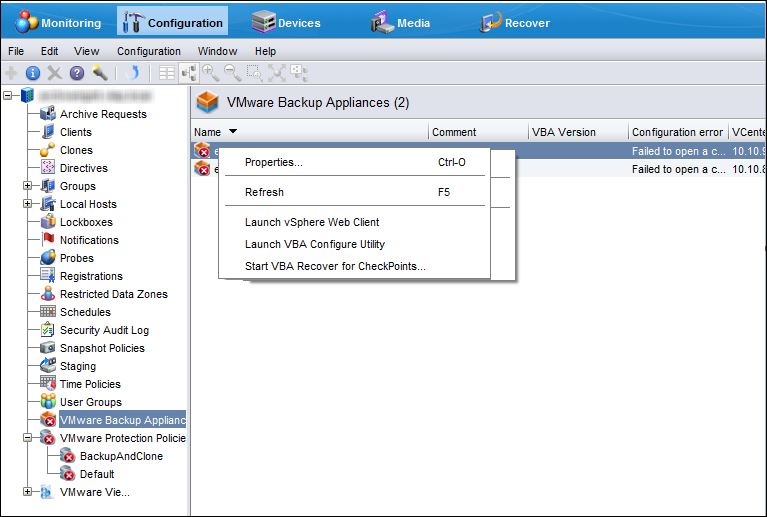
How to Delete VBA Node in Networker

How to Delete VBA Node in Networker

Networker Ver: 8 to 9

If you want to remove VBA node entirely and delete it's backups from Networker server. The VBA node is online and responding to request from Networker server. Before Doing anything please consult with EMC Support for Assistance because VBA Node delete/remove is not recommended by EMC as a troubleshooting step.

Before starting any critical configuration you should take first backup of nsrdb and mm directories (Particular directory which related with that configuration)

Connect to Networker backup server and open the following directory

 <networker-install>\nsr

e.g   
·         Unix: /nsr/ 
·         Windows C:\Program Files\EMC NetWorker)

Make a copy of the following directories:

res\nsrdb
res\mm

After successfully copied mentioned directories you can start your actual configuration.

Remove all save sets for the client-id for this VBA node

List the Saveset:

mminfo  –c  <vba-name>  -kot

Remove Saveset:

nsrmm -d -S <SSID>

If the VBA is NOT online, then use the -X option to delete the Save set:

nsrmm -X -d -S <SSID>

Remove all workflows associated with the VBA and Delete VBA Mtree

Using GUI (NMC):

1. Login to NMC

2. Go to Configuration tab and click VMware Protection Policies

3. Sort the policies by VBA List

4. Open the first policy that has this VBA listed, go to VMware Backup Appliance Selection      tab and uncheck the VBA name.

5. Wait for the State column to change to Success


Using CLI (nsradmin):

nsradmin> p type: nsr hypervisor; name: <vcenter-name>
nsradmin> Delete

Remove VBA server resource using nsradmin

 d type: NSR VBA Server; name: <vba>

Note: This step may need to be done using offline nsradmin if VBA is NOT responding

Delete the VBA Appliance Delete the relevant VBA node VM from the vCenter server

On the NetWorker server, run nsradmin command utility to find the VBA DPN ID:

nsradmin> show name

nsradmin> show DPN ID

nsradmin> p type: nsr vba server; name: VBA-FQDN

To delete the storage unit on Data Domain:

Login to Data Domain as Admin and run command,

ddboost storage-unit delete <storage-unit>

Clean file system if required using command, filesys clean start


If the External proxy is no longer needed delete the external proxy virtual machine

Sunday, February 7, 2016

EMC ELECT 2016

Friends I would like to share that I am elected as EMC Elect 2016 with another 70 experts from 150 finalists.

Below is the link for your reference to see the list of elected candidates


This is a very funny incident with me about EMC elect. When I started working on EMC product and I heard from someone that there is one kind of election EMCElect. I was very surprised because I thought EMC is also conducting election like politicians  but after reading about EMC Elect I got to know that this is an honor for EMC expertise.

So that time I was very excited to grab much information about EMC Elect. I always share my knowledge regularly on EMC Community Network, sharing on Twitter too. I also started sharing my technical tips through blogs and on EMC community forum for knowledge sharing.

I was shortlisted For EMC ELECT 2013 but was not selected, and I took it as a challenge and I said to myself that next time I will take more efforts and again participate in 2014 and finally I got first EMC honor in 2014 and again in 2016.

I would like to thanks all who voted me and fulfil to complete this program.

This is unique initiative by EMC and I am really enjoying to participate year again year.

Special thanks to Mark Browne ‏@DathBrun and all known unknown people who were involved in this activity.

Tuesday, February 2, 2016

VSS System Writer is not found on this system

The VSS System Writer is not found on this system:

While backing up Windows 2008 and 2012 server on EMC Networker and you are getting below error, there will be many causes for this error. This is a very common permission issue.


98266:save: The VSS System Writer is not found on this system.  The backup is stopping because the System Writer is required for a successful system state backup.  Have the system administrator check the VSS infrastructure and fix the issue.

You should first try below solution:

Start or Restart below services:

1. COM+ Event System
2. COM+ System Application
3. Distributed Transactions Coordinator
4. Microsoft Software Shadow Copy Provider
5. Volume Shadow Copy service
6. Networker remote exec service

And try to take test backup, if it fails again then you should go with below Microsoft solution.

The system writer fails because permissions to files in the %windir%\winsxs\filemaps\ or %windir%\winsxs\temp\PendingRenames directories are incorrect.

Solution:
To resolve this issue, type the following commands from an elevated command prompt:
Takeown /f %windir%\winsxs\temp\PendingRenames /a
icacls %windir%\winsxs\temp\PendingRenames /grant "NT AUTHORITY\SYSTEM:(RX)"
icacls %windir%\winsxs\temp\PendingRenames /grant "NT Service\trustedinstaller:(F)"
icacls %windir%\winsxs\temp\PendingRenames /grant BUILTIN\Users:(RX)
Takeown /f %windir%\winsxs\filemaps\* /a
icacls %windir%\winsxs\filemaps\*.* /grant "NT AUTHORITY\SYSTEM:(RX)"
icacls %windir%\winsxs\filemaps\*.* /grant "NT Service\trustedinstaller:(F)"
icacls %windir%\winsxs\filemaps\*.* /grant BUILTIN\Users:(RX)


net stop cryptsvc
net start cryptsvc


Type the following command to verify that the system writer is now listed: vssadmin list writers


If the system writer is missing, check the Application event log for the following event

for more info check Microsoft Technical Tips :

https://support.microsoft.com/es-ar/kb/2009272#/es-ar/kb/2009272


Slow backup Issue

Networker slow backup issue We are facing slow backup issue many times or previously added clients suddenly slow backup issue occurs. ...